14 October 2026
5 tasks an AI agent can take over in your company this month
Nikolay Kalchev · 14 October 2026
You do not need a big AI strategy to get started. In most companies the best first step is small: pick one routine task that takes up hours every week, hand it to an AI agent and keep a person in charge of the decisions. Such a first agent can usually be planned and started within a few weeks.
Below are five tasks that suit almost any business. For each one we describe what the agent does, what it needs, and what stays with your team. If you are not yet sure how an agent differs from a chatbot, start with What is an AI agent — and how is it different from a chatbot?.
1. Sorting the shared inbox
Shared mailboxes such as office@ or sales@ fill up with offers, questions, invoices, complaints and spam. Someone has to read everything just to decide who should deal with it.
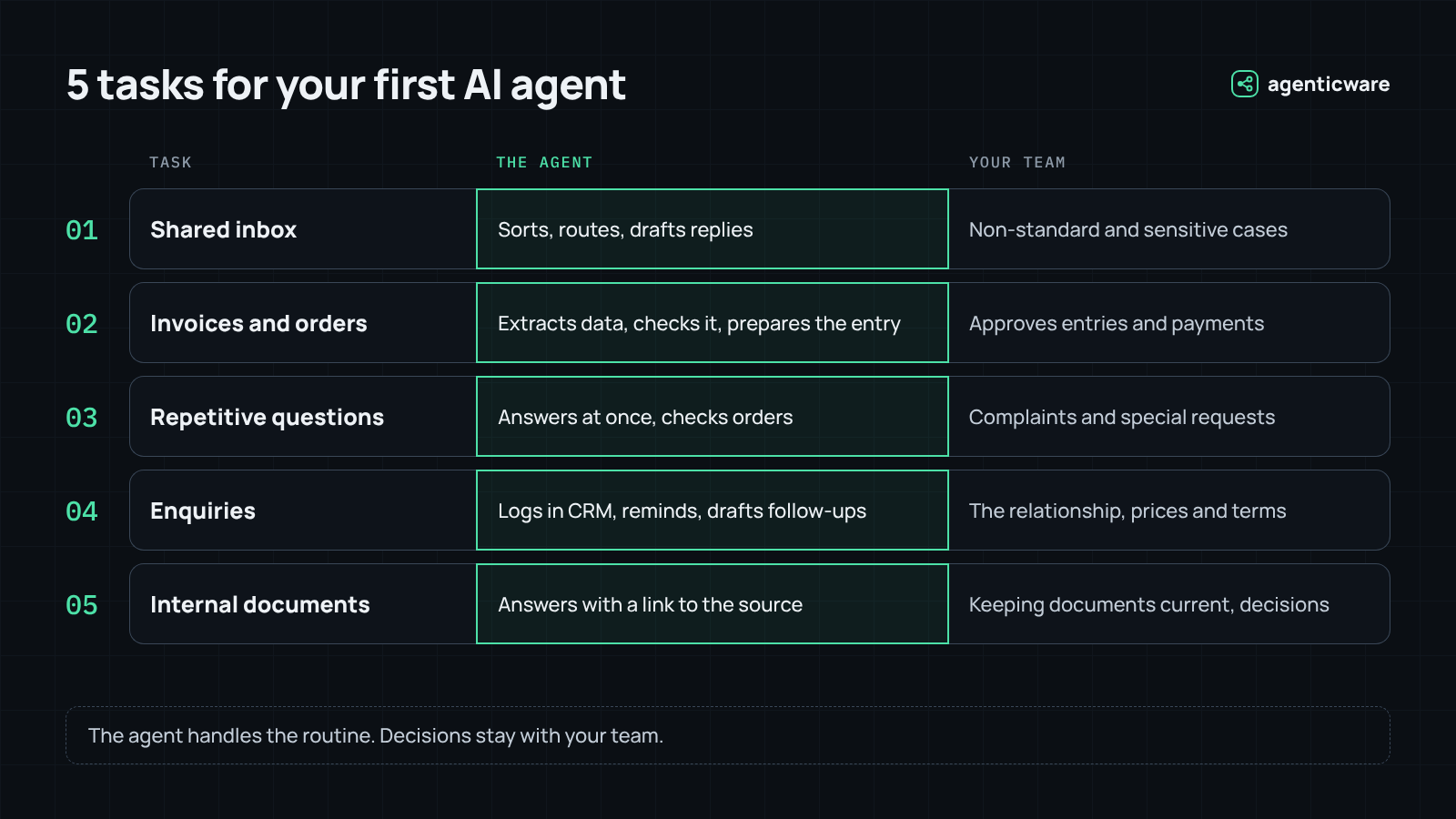
What the agent does: reads each incoming email, recognises what it is about, labels it and forwards it to the right person or team. For simple, standard questions it prepares a reply.
What it needs: access to that one mailbox and a short description of who handles what.
What stays with your team: replies that are not standard, and anything sensitive, such as complaints or legal matters. At the start, a person also checks the prepared replies before they are sent.
2. Processing invoices and orders
Supplier invoices and customer orders often arrive as PDFs or scans. Typing the supplier, amounts, VAT and dates into the accounting or order system is slow, repetitive work, and mistakes are easy to make.
What the agent does: reads the document, extracts the key data, checks it against simple rules (is the supplier known, do the totals add up, is there a matching order) and prepares the entry for your system.
What it needs: the documents, for example from a mailbox or folder, and access to enter data in the accounting or order system, or to prepare a file for import.
What stays with your team: approving the entries, especially payments. Anything that does not match the rules goes to a person.
3. Answering repetitive questions
Delivery times, opening hours, order status, how to return a product: the same questions arrive again and again, by email or through the website.
What the agent does: answers standard questions immediately, at any time of day, using your own information. For questions like order status, it looks up the actual order instead of giving a general answer.
What it needs: your current information (prices, terms, FAQ) and read access to the systems that hold the answers, such as orders or deliveries.
What stays with your team: complaints, special requests and anything outside the agent’s rules. People are told they are talking to an AI, as the EU AI Act requires, and can always reach a person.
4. Following up on enquiries
Sales enquiries get lost: someone was busy, the offer was sent but nobody followed up, the customer waited too long. Each lost enquiry is lost revenue.
What the agent does: records every new enquiry in the CRM, reminds the right person when a follow-up is due and drafts a personal follow-up message based on the earlier conversation.
What it needs: access to the sales mailbox or contact form and to the CRM, plus your rules for when to follow up.
What stays with your team: the relationship with the customer. The salesperson reviews and sends the messages, and decides on prices and terms.
5. Finding information in your own documents
Procedures, price lists, contracts, manuals: the answer exists somewhere, but finding it takes time, or depends on one colleague who knows where everything is.
What the agent does: employees ask a question in plain language, for example in Teams, and the agent answers from your own documents, with a link to the source so the answer can be checked.
What it needs: read access to the selected folders, for example in SharePoint or Google Drive, and respect for existing permissions: an employee should only get answers from documents they are allowed to see.
What stays with your team: keeping the documents up to date, and decisions based on the answers.
How to choose your first task
The best first task is not the most impressive one, but the one with the clearest benefit and the lowest risk. A good candidate:
- happens often, every day or every week;
- follows clear rules that you could explain to a new colleague;
- works with information that is already digital, such as emails, PDFs or data in a system;
- does not cause serious harm if a step needs to be corrected, because a person checks it.
What happens in the first weeks
- Free AI audit: a short conversation about how your team works, and a list of tasks worth automating.
- Design: we agree on the task, the rules, the access the agent needs and the points where a person approves. Security and data protection are part of this step, as described in Is AI safe for my company’s data?.
- Build and test: the agent is connected to your systems and tested on real examples, first without acting on its own.
- Go live with supervision: the agent works and a person checks its output. As confidence grows, the checks can be reduced where it makes sense.
You can see examples of the agents we build on our homepage, and the rules that apply to AI systems on our Regulations page.
Frequently asked questions
Do we need new software?
Usually not. The agent works with the tools you already use, such as email, Microsoft 365 or Google Workspace, your CRM and accounting software. If a system cannot be connected directly, there is often a simple workaround, for example via export and import of files.
What if our data is messy?
That is normal. Part of the first step is to see which data the task really needs and to set rules for unclear cases. Often a first agent also shows where the data can be improved.
How much does it cost?
It depends on the task, the systems and the volume. After the free audit we give you a concrete proposal for the first agent, and support continues as a monthly subscription that covers monitoring, updates and improvements.
Will an agent replace our employees?
The aim is to take over repetitive work, not judgement. In practice, the time saved usually goes to customers, sales and tasks that were always postponed.
Nikolay Kalchev
Nikolay Kalchev is CEO of Velox Ltd, the IT infrastructure and security company behind Agenticware. Learn more about Velox →